A Standing Desk That Fits a Small Home Office
A height-adjustable desk is usually discussed as a health purchase. This article treats it as something more mundane and more useful to plan for: a piece of furniture that moves. Its top travels up and down by tens of centimetres, carrying a monitor, a laptop and everything plugged into them. Its feet occupy floor. Its cable loops open and close. In a small room, those movements decide whether the desk fits, far more than its listed width and depth.
Whether alternating between sitting and standing suits you is a personal question, and this is not the place to settle it. People choose adjustable desks for many reasons, from comfort to variety to sharing a desk between people of different heights. Nothing here claims that standing burns a particular number of calories, cures back pain or makes anyone more productive. The aim is narrower: if you have decided to try one, make sure it works in the room you have.
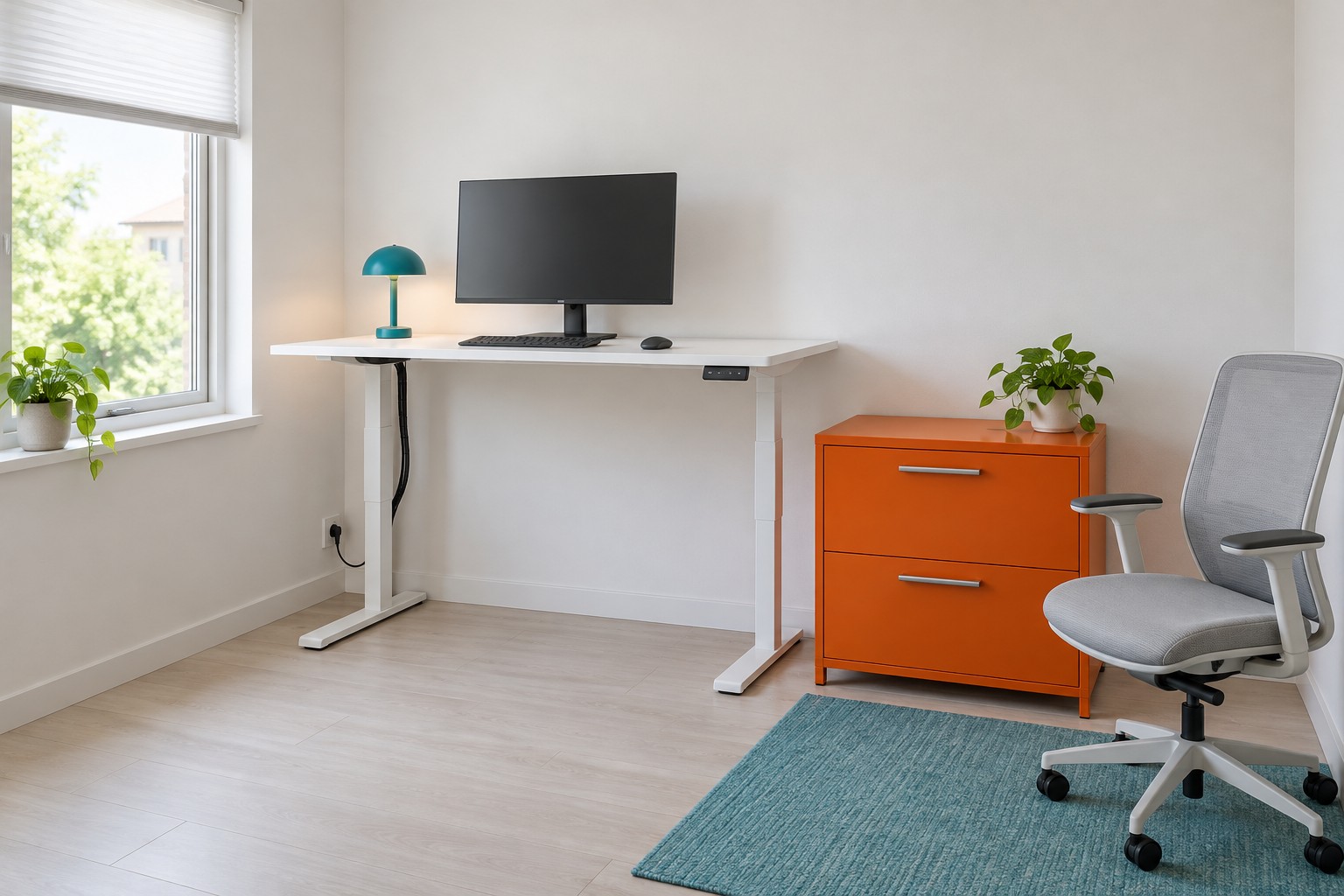
Image credit: pxef.com. AI-generated design concept.
This proposal assumes a room of 2.8 by 3.4 metres, about 9.2 by 11.2 feet. A height-adjustable desk with a 140 by 70 centimetre top, roughly 55 by 28 inches, stands against the far wall on a white steel frame, shown raised to a standing height. A single monitor sits on its stand, with keyboard and mouse in front. A cable bundle rises from a wall outlet with a visible loop of slack. The office chair is parked to one side, clear of the desk. A low orange cabinet stands beside the desk with a gap between them, and turquoise accents and brushed steel details complete the scheme. These are design assumptions; the specification of any real desk must come from its maker.
The white desk has two broad feet running front to back, a small dark controller beneath its front-right edge, and a turquoise lamp beside the monitor. The orange drawers sit alongside rather than beneath it. A dark cable route follows the left leg, with a visible loose section near the outlet. The grey chair is parked on the turquoise rug at the right; a real desk’s full travel still needs checking with all of these objects in place.
Start with the base, because it is the part that stays on the floor. Adjustable desks have legs with feet that usually run front to back, often nearly the full depth of the top. That means the floor beneath the desk is less open than under a four-legged table: the feet are low obstacles where a chair base, a bin or your own feet might want to go. Look at the frame’s foot length and the width range of its crossbar, and check how far the feet project beyond the top, if at all. In a small room, a foot that sticks out into the walking route is a trip hazard that never moves.
Then check the height range against the people who will use it. A manufacturer’s specification lists a lowest and a highest position. The lowest needs to be low enough for comfortable seated work with your chair; the highest needs to be high enough for standing in the shoes you actually wear at home, with the keyboard at a comfortable height. Ranges vary considerably between frames, and some are designed with taller or shorter users in mind. Do not assume the middle of the range will suit you; measure your own seated and standing working heights and compare them with the published numbers.
Load is the third specification. Each frame has a rated lifting capacity, whose definition must be checked: some ratings include the desktop and others describe the usable payload. Account for the top as directed, then the monitor, stand or arm, laptop, lamp, books and clamps. Spread the weight sensibly, check the rating against your real kit and leave margin. Do not judge capacity by the price or size of the frame. A heavy top, large display and reference books can add up.
Cables are where a moving desk most often goes wrong. When the top rises, every cable between it and a fixed connection must have enough free length to follow without tension. Manufacturer instructions for these desks warn that cords need enough slack so they do not pull as the desk moves, and that the power cord and accessory cables must be long enough for the full travel. Provide a controlled, supported service loop or cable guide as the desk maker recommends; do not stretch a lead or tie its moving section so it cannot extend. With the area clear, check the full travel as directed before final tidying. Keep the loop out of the chair’s path and away from the feet. The route from the outlet up a rear leg into a tray under the top, described in our guide to cable management you can still reach, suits an adjustable desk well, as long as the slack is in the right place.
Think about the space the desk moves through, not just the space it sits in. Picture the top and everything on it as a block that travels from its lowest to its highest position. Anything inside that block’s path is a collision waiting to happen: a shelf above the desk, a window sill, a radiator valve, a wall lamp, a curtain. Desk instructions typically ask for a small clear gap around the moving parts and above the items on the desk. In this concept, the wall above the desk is kept clear of shelves; a shelf that suits seated work could catch the monitor when the desk rises.
The same applies below. Objects under the desk must be lower than the desk’s lowest position, or the top will come down onto them. That rules out tucking a tall drawer unit or a printer under the top. In this concept, the low orange cabinet stands beside the desk rather than under it, with a gap proposed in the illustration; the real clearance must meet the desk maker’s instructions throughout its travel. Its own top is lower than the desk’s seated height, so it works as a side surface for papers at both heights.
The chair needs a parking place for the standing periods. A chair beneath the desk can become a collision when the desk lowers, so park it outside the moving envelope. In this layout, the chair parks to the right of the desk, beyond the cabinet, in the open floor rather than in the route to the door. Mark that position; otherwise the chair tends to end up wherever you stood up.
The controls deserve a moment’s thought. The keypad usually mounts under the front edge of the top, on one side. Put it on the side you naturally reach with, and check it remains reachable at both heights. Many controllers can store preset heights, which makes changing position quicker and more consistent. If children are in the home, follow the maker’s supervision and lock or disconnection instructions, and keep them clear while the desk moves. A lock feature does not replace supervision. Moving desks can pinch hands or feet between the top and fixed objects, so the clear space around the frame is a safety measure as well as a convenience.
A small room makes one more trade-off visible. An adjustable desk is bulkier underneath than a simple table, often more expensive, and its motor and frame add weight. If you expect to stand only occasionally, a fixed desk plus a compact standing surface elsewhere, such as a kitchen counter used for an hour, may suit the room better. If you expect to change positions through the day, the adjustable desk earns its floor space, provided the room is planned around its movement.
Before buying, measure three things in your room: the floor area the frame’s feet will cover, the clear height above the desk position up to the first obstacle and the distance from the nearest outlet to where the cables will rise. Compare them with the frame’s specification. Then mark the chair’s parking place on the floor. A standing desk that fits is one where all four of those agree.