A Home Office for a Large Monitor in a Small Room
Large monitors have become ordinary. For spreadsheets, editing, design work or simply keeping two documents side by side, a 32 inch screen or a 34 inch ultrawide can sometimes replace a pair of smaller displays. Then it arrives in a small room and sits on a desk that was chosen for a laptop. The screen ends up too close, its stand eats the keyboard space, and the person using it spends the day turning their head from one edge to the other.
A big screen in a small room is entirely workable. It simply asks for the right surface and a little planning around depth, width, connections and light. The size of the room matters less than you might expect. What matters is the size of the desk and the distance between your eyes and the glass.
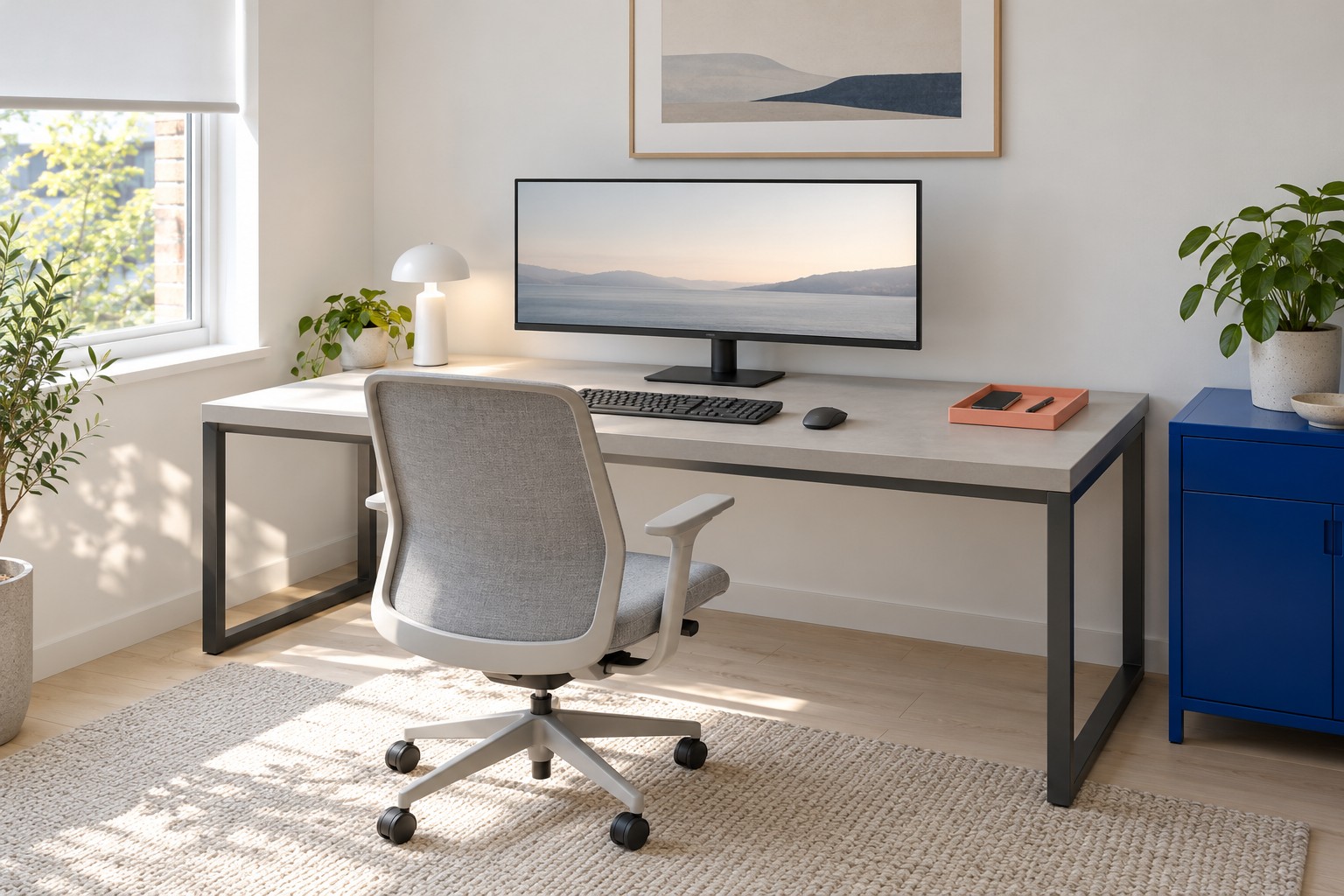
Image credit: pxef.com. AI-generated design concept.
This proposal assumes a room of 2.8 by 3.2 metres, about 9.2 by 10.5 feet, with a window on the left wall. Against the far wall stands a deep worktop of 150 by 80 centimetres, roughly 59 by 31 inches, on a charcoal steel frame. A single large unbranded monitor sits on its own stand in the middle, with the keyboard and chair centred in front of it. A low cobalt cabinet stands to the right of the desk, and a coral desk tray adds one warm note. The screen has a matte finish, and daylight arrives from the side. These are design assumptions for the concept, not a recommendation of a particular screen size or product.
In the illustration, the stand has a visible black upright and a broad base behind the keyboard, rather than a screen apparently floating above the worktop. The charcoal frame leaves the space underneath open. A cobalt cabinet stands alongside the desk, while the low coral tray gathers the phone and pen at the right. The pale blind filters the side window without placing a bright opening directly behind the display.
Start with depth, because it is the dimension a large monitor punishes most. The stands that come with big screens are often deeper and wider than those of smaller displays, to keep a heavy panel stable. For this planning example, allow a base around 25 to 30 centimetres deep, then replace that allowance with your monitor’s actual footprint. Add a few centimetres behind it for cables and connectors. In front of it, leave space before the keyboard, then the keyboard itself at around 13 to 15 centimetres, then some room for forearms at the front edge. On an 80 centimetre desk, these example allowances can fit, and the screen can sit well back. On a 60 centimetre desk, the same stand pushes the screen toward you, and the keyboard ends up near the edge. The detailed arithmetic for different kits is in our guide to how much desk space your work needs.
Distance is personal, and it is worth testing rather than adopting a single number. Official workstation guidance often gives a broad starting range for how far the screen should be from your eyes and notes that the right distance depends on the person, the screen and the text size. With a large screen, the useful test is simple. Sit normally and look at both edges of the screen. If routine work repeatedly makes you turn your head to read the far corners, or the centre feels uncomfortably close, try more viewing distance, a different layout or larger text. Occasional glances do not mean the screen is wrongly placed. A deep desk lets you move it back until both edges are easy to scan with your eyes rather than your neck.
Width brings a different constraint. A 32 inch widescreen is around 72 centimetres across including its frame; a 34 inch ultrawide is closer to 80. On a 150 centimetre desk, either leaves room on both sides for a lamp, a notebook or a phone. On a 120 centimetre desk, the screen leaves less room for other work, so lay out the actual equipment before committing. Centre the screen and the keyboard on the chair. A large display set off to one side to make room for something else will have you working with your head turned for hours.
Scaling matters as much as size. Large, high-resolution screens often show text very small at their native setting. Operating systems let you scale the interface up so text stays readable at your chosen distance. Many people find a large screen most useful when it is set back and scaled sensibly, rather than pulled close to make tiny text legible. Spend a few minutes adjusting text size and scaling in the system settings before deciding the screen is too big for the room.
Connections take space you do not see from the front. Large monitors often have their ports on the back or underside, sometimes facing down, and the cables that plug into them need room to bend. A screen pushed against the wall can trap those cables. Leave a gap behind the stand, keep a reachable route for the power lead and video cable, and avoid bending connectors sharply. If the screen has a separate power brick, give it a place off the floor. Our guide to cable management you can still reach follows a serviceable route through a desk like this.
A monitor arm is the obvious way to free up depth, and in some rooms it is the right answer. It lifts the screen off the desk and lets you push it back over the rear edge, or swing it aside. It is also a piece of equipment with specifications that must match. Check that the monitor has a compatible mounting interface on its back; the industry’s mounting standard defines different interfaces for different sizes and weights, and some curved or very thin displays need an adapter or do not support arms at all. Check the arm’s weight range against the monitor’s actual weight without its stand. Check that the clamp suits your desk’s thickness and edge, that nothing under the desk, such as a crossbar or a drawer, blocks it, and that the desk top is solid enough to hold the load at a distance. If any check fails, keep the stand and consider a deeper desk or smaller screen.
In this concept, the monitor stays on its own stand. For the assumed equipment on this 80 centimetre desk, the stand is proposed to fit, and there is no need to introduce an arm whose clamp the steel frame might obstruct. That is a deliberate choice for a small room: fewer added components and a screen that can be moved if the layout changes. Its own stand still needs correct assembly.
Light is the last big question, because a large screen is a large reflective surface. A matte screen finish helps. So does the window’s position. With daylight from the side, the screen avoids a bright window directly behind it or reflected in it. A large display facing a window catches sky, while one with a window behind it competes with the daylight beyond it. If your room only allows one of those, adjustable shading becomes essential; our guide to a window without screen glare works through the options. In the evening, a lamp that lights the desk and the wall behind the screen keeps the room from collapsing into one bright rectangle.
Storage in a small room with a deep desk needs to stay out of the chair’s way. The cobalt cabinet sits beside the desk rather than behind the chair, holding papers, cables and the things that would otherwise collect on the generous worktop. Its strong colour balances the charcoal frame and dark screen, and the coral accessory provides a small counterpoint. A deep desk invites clutter simply because there is room for it; a cabinet within reach gives that clutter somewhere better to go.
There are honest limits. A 150 by 80 centimetre desk takes more than half of a 2.8 metre wall and a quarter of the room’s 3.2 metre depth, before the chair needs its own space. In some small rooms that leaves too little floor for the chair and a route past it. If that is your situation, a slightly smaller screen on a deep desk will usually work better than a very large screen on a shallow one. The size you can use comfortably is set by the distance you can give it.
Before buying a large monitor or a new desk for one, mark out the screen’s width on the wall at the height it would sit and tape the desk’s depth on the floor. Sit at the taped edge and look at the marks. If you can take in the full width comfortably with the chair where it would be, the room can hold the screen. If you cannot, change the desk before you change the monitor.