A Home Office Background That Works for Video Calls
The part of your office you see all day is in front of you. The part your colleagues see is behind you. Those are usually different walls, which is why so many carefully arranged offices produce calls framed by a laundry rack, an open door or a wardrobe mirror. The camera has its own view of the room, and it pays to design for it directly instead of assuming that a room which looks good from the chair will look good on screen.
Start by finding out what the camera actually sees. Open the application you use for calls, at the window size you normally use, with the camera in its usual position, and look at the preview for a few minutes. Then do it again at the time of day you most often have calls. Notice everything in the frame: the corner of a bed, a heap of post on a shelf, a doorway someone might walk through, a bright window behind your head. That preview is the real background. The rest of the room, however handsome, is invisible to everyone else.
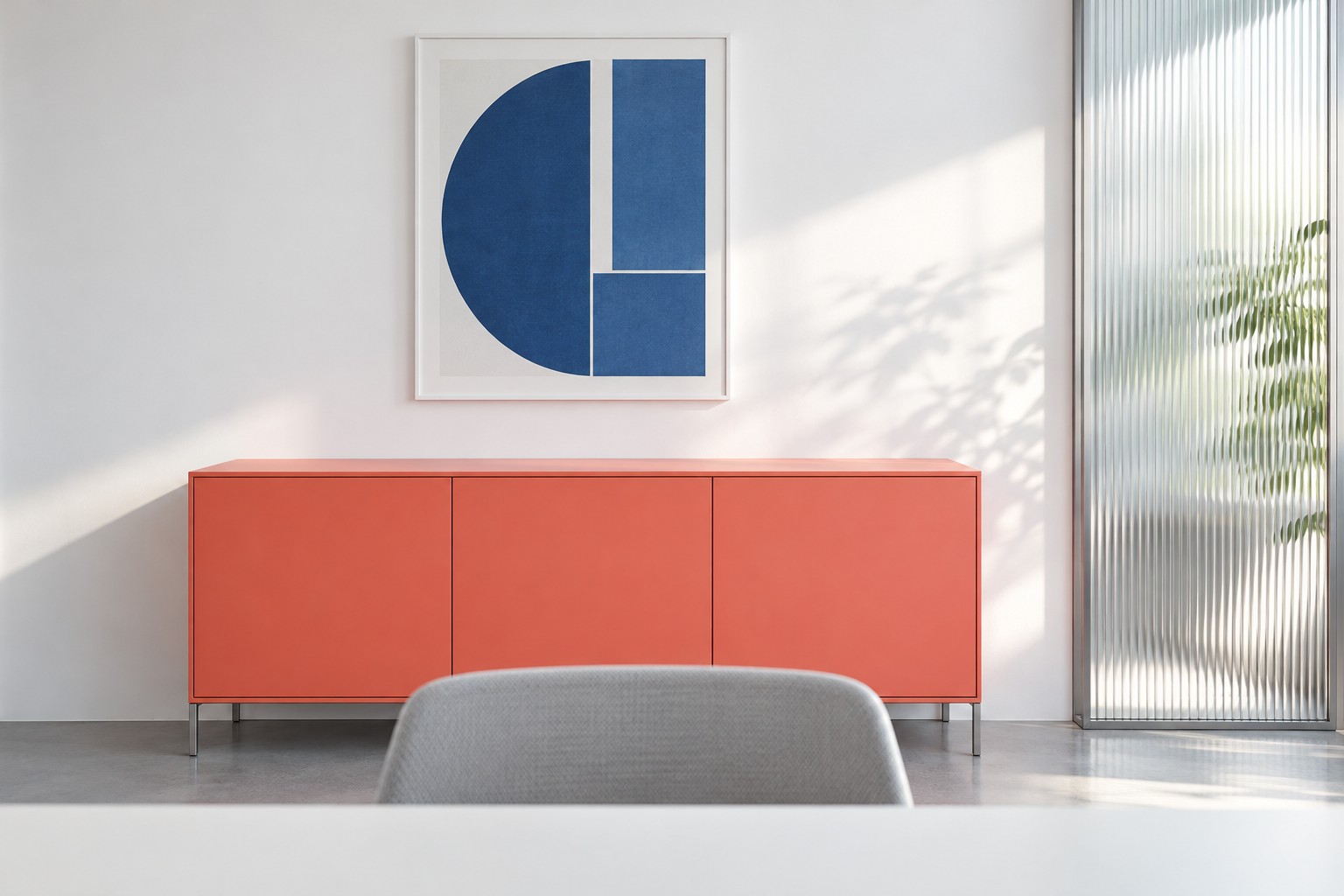
Image credit: pxef.com. AI-generated design concept.
The concept here is a proposed camera view, not a screenshot of a real call. It looks from roughly webcam height across a small edge of the desk toward the wall behind the person’s chair. That wall is crisp white, with a low coral cabinet whose top sits below shoulder height when you are seated, a single simple blue print above it, and a ribbed glass panel at one side. Daylight comes from a window to the side. The design assumes a room of 3 by 3.6 metres, about 9.8 by 11.8 feet, with the desk against one long wall and the background wall about a metre behind the chair. Those are assumptions for the concept; in your room, the preview decides.
Turning the desk is usually the biggest lever, and it often means giving up the view you like. Plenty of people put their desk facing an attractive wall of books or prints and then sit with their back to the door. From the chair that is a lovely arrangement. To the camera it is a doorway, with whoever happens to pass through it. Reverse the logic. Choose the wall you are happy to be seen in front of, then sit with your back to it. If the room offers only one sensible desk position, the camera can sometimes be moved instead. A laptop on a stand, or a separate camera on the monitor, changes the angle more than you might expect.
Keep doorways out of the frame where you can. A door behind you is a doorway for every household member, delivery and pet, and closing it is not always possible or enough. Placing the door to the side, outside the camera’s view, means movement in the house happens off screen. If that is impossible, it helps to agree a simple signal that a call is on, and to keep the door’s line of sight in mind when someone needs to cross the room. The camera does not care whose fault it is.
Then think about distance and depth. A background very close to your chair tends to look cramped and makes every object loom. A background a metre or so behind you usually reads as a wall with a few things on it, with a simpler composition; any optical blur depends on the camera and its settings. A long view into the rest of the home, on the other hand, shows far more than you probably intend. The low cabinet in this concept sits close enough to frame the shoulders and keep the composition simple, and its top is clear of clutter because anything on it becomes part of every call.
Reflective surfaces deserve a careful look in the preview. A glazed picture frame can carry a reflection of the window or the screen. A mirrored wardrobe door shows the rest of the room, sometimes including you from a second angle. Glossy cabinet fronts pick up lamps. The ribbed glass panel in this concept is there partly because ribbed glass breaks reflections into soft vertical streaks rather than a clear image, and partly because it adds texture and light to an otherwise plain wall. Unglazed prints, matte paint and matte cabinet fronts make the background calmer on screen.
Light direction matters as much as what sits on the wall. A bright window behind you can leave your face dark if the camera exposes for the window. A window to one side gives your face shape and keeps the background readable. In this concept, side daylight does that job. For calls at other times, a lamp positioned in front of you and slightly to the side, aimed so it lights your face without glaring into the screen, is usually more useful than overhead light. Our guide to working beside a window covers the glare side of the same relationship. The background itself benefits from even light; a dark wall behind a well-lit face can look like a void, while a wall with its own soft light reads as a room.
A handsome wall is not always the right one. A colourful shelf of books can look busy and invite questions about specific titles. A large striking artwork can be distracting at small sizes and change dramatically with the camera’s colour handling. A family noticeboard can show calendars, names or children’s school details. Something with fewer, larger elements tends to work better on a small video tile: a plain wall, one print, a low piece of furniture with a strong colour. That is why the concept keeps it to a coral cabinet, a blue print and a ribbed glass panel.
Then decide how much changes between ordinary work and a call. Ideally, very little. The background should be ready without a ritual, which argues for keeping its surfaces clear and its contents fixed. A small call-mode adjustment is reasonable: close the door, switch on the face lamp, raise the laptop to bring the camera closer to eye level, perhaps lower a blind slightly to balance the light. If call mode needs ten minutes of moving laundry and shifting furniture, the background has been designed for a single picture, not for the working week.
Background effects in calling software are useful, and they have limits. Common applications offer blurred or replacement backgrounds, and these can hide a messy room. They can also produce flickering edges around hair and hands, depend on the device’s capabilities, and occasionally reveal glimpses of the real room. Even the help pages for these features warn that background effects may not prevent sensitive information from being visible. Treat blur as a convenience, not a guarantee.
The same caution applies to confidentiality more broadly. An attractive background tells colleagues nothing about who else can hear the call. A neat wall and a closed cabinet do not stop sound travelling through a door or a shared wall, and they do not stop someone in the room from seeing your screen. For confidential conversations, the relevant questions are who is in the home, which door can be closed and whether another room or another time would be better. Our article on two people working in one room deals with overlapping calls directly.
Before you buy anything, test with what you have. Move the laptop, sit where you would sit, open the preview and change one thing at a time: the desk angle, the door, a lamp, the object on the cabinet. Take a screenshot of each version for yourself, then compare them side by side. The best background is usually the simplest one you can keep ready without thinking about it, lit from the side, with no doorway behind you and nothing on the wall that you would rather not explain.