A Small Home Office With Somewhere to Put the Printer
The printer is the object that exposes the difference between a tidy office picture and a usable office. It fits on the shelf, technically, until you need to open the scanner, load paper or retrieve the sheet that stopped halfway through. Then everything comes down onto the floor. Give the machine its working space at the planning stage and a small home office becomes much less irritating to use.
Start by describing what printing means in your household. A few return labels each month make a different demand from regular scanning, invoices or long documents. If you barely use the machine, its position need not be within arm’s reach of the keyboard. If you scan frequently, the lid and the place where you stand matter more than keeping the printer out of sight. The storage decision should follow those ordinary actions.
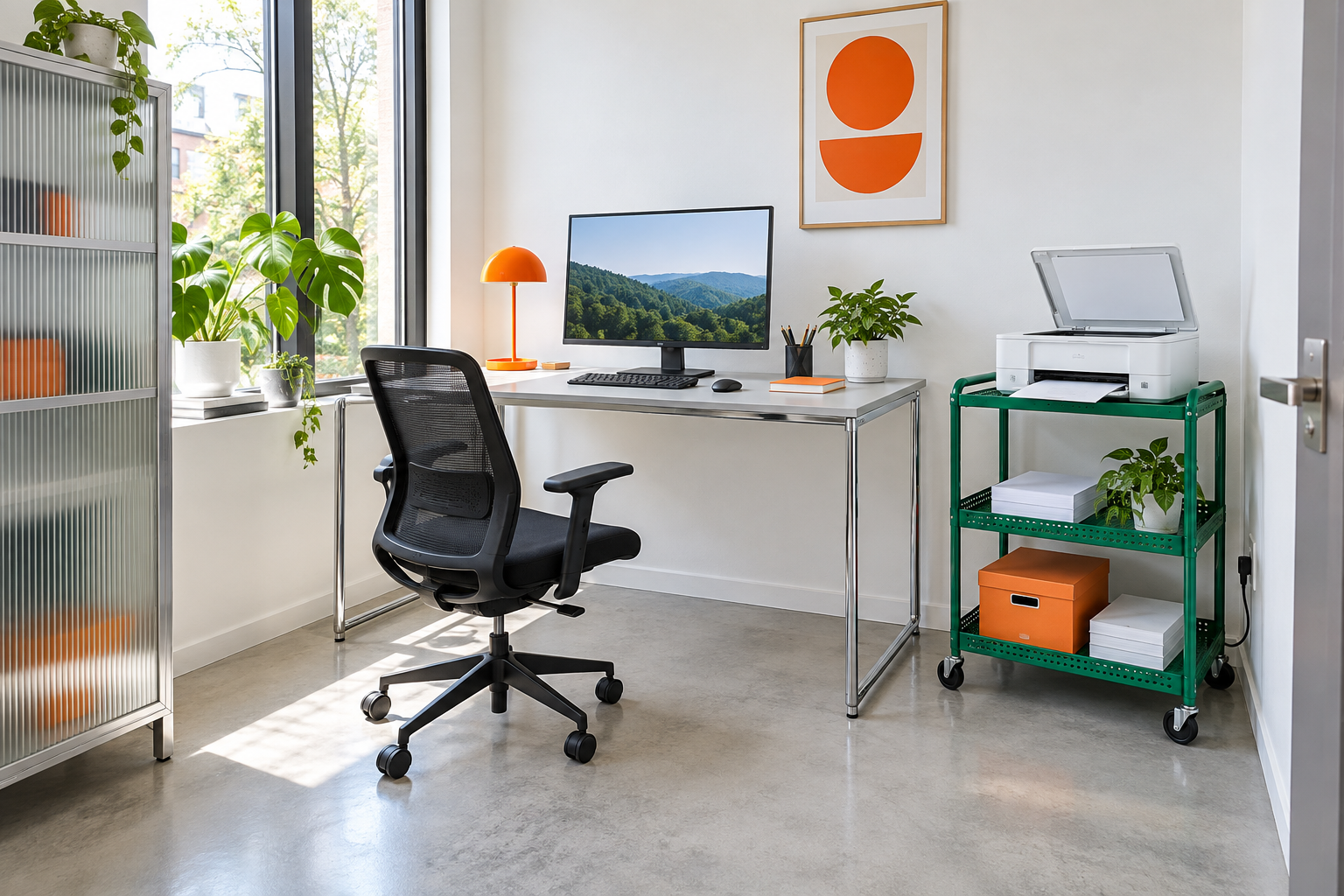
Image credit: pxef.com. AI-generated design concept.
The image puts the printer on an emerald-green perforated-metal trolley beside the desk, with its scanner lid open and a sheet projecting toward the front. Paper and an orange supply box occupy lower shelves. A pale worktop on a slim chrome frame leaves the main desk available for the monitor, keyboard and mouse, while an orange lamp and geometric print make the equipment corner feel intentional. Ribbed glass storage at the left edge brings another light material into the room. It is a bright industrial proposal rather than an attempt to disguise the printer as part of traditional cabinetry. The open lid is the point: equipment needs space to do something.
Our proposal assumes a room measuring 2.7 by 3.2 metres, about 8.9 by 10.5 feet, with a desk measuring 130 by 70 centimetres, roughly 51 by 28 inches. The separate equipment surface is an idea to test with your own machine, not a claim that any printer will fit the illustrated trolley. Check the whole printer in use, including its lid, trays, cables and the parts you need to reach for maintenance. The closed dimensions in a product listing are only one part of that measurement.
Open the scanner cover and paper trays before taking out the tape measure. Some machines load paper from the front, others need access behind or above. Cartridge replacement and jam clearance may require another opening entirely. Follow the manual for the actual model and make a rough outline of its operating space. That outline is more useful when choosing furniture than a measurement of the plastic body with everything folded in. Avoid buying a cabinet first and discovering afterward which functions you have made awkward.
An open top surface is often the least complicated answer for an all-in-one machine. It leaves the scanner accessible and makes the printer easier to inspect. A lower shelf can keep paper nearby, while a drawer or box contains spare supplies. The illustrated trolley gives those jobs separate levels instead of placing everything around the printer’s feet. It also turns the equipment station into a deliberate design element. A vivid green metal unit can look entirely at home beside a restrained chrome desk.
The surface itself needs checking. Use furniture that supports the equipment’s weight, stays stable in normal operation and provides a suitable flat base. A trolley’s appearance does not establish its load capacity, and casters introduce questions about brakes, movement and floor conditions. If you expect to roll the unit out for access, test where it can go and how its power and data connections behave. A wheeled stand that drags a cable through the chair’s path is only mobile in the least convenient sense.
A cabinet can still be a good answer, but distinguish storage from operation. A door that closes around an idle machine does not show that the equipment can run in that enclosure. Check ventilation, heat, cable clearance and the manufacturer’s placement requirements. Perforated furniture fronts may suit the visual direction, yet they do not prove sufficient airflow. An open shelf with a fixed shelf immediately above it can also obstruct the scanner lid. Look at the full movement, not merely whether the printer can be slid into the opening.
Keep spare paper in a sensible location rather than treating the nearest gap as storage. Follow the paper and printer makers’ storage guidance, and protect supplies from the spills and knocks that come with ordinary desk use. A small amount near the machine may be enough, with bulk supplies elsewhere. There is no advantage in making a compact office feel like a stationery storeroom if you only print occasionally. The lower shelves in this concept are for manageable working stock, not an excuse to collect every ream beside the chair.
Give finished pages a destination too. Output left on top of the scanner soon becomes an obstacle to the next scan. A simple tray for documents awaiting action can separate them from blank paper and general filing. If the household shares the printer, agree what happens to someone else’s pages rather than letting them migrate between surfaces. This is an unglamorous part of the design, admittedly, but it is the part that stops a useful piece of equipment becoming another pile.
Listen to the printer from your work position. If it interrupts calls or concentrated work, moving it farther away may be more useful than improving the furniture around it. In a shared office, access from the room entrance can be preferable to placing it behind one person’s chair. Our guide to two people working in one room looks at those overlapping routines. An extra few steps to collect a page may be a reasonable exchange for a clearer desk and fewer interruptions.
Cable access deserves the same attention as paper access. Leave plugs reachable, keep the route away from chair wheels and walking paths, and allow only the movement the equipment and connections can safely accommodate. A wireless network connection removes one possible data cable; it does not remove the need for power or solve the physical layout. Test printing and scanning from the final position before treating the installation as finished. The best place on a drawing is not useful if the household cannot reliably use the machine there.
The desktop you recover should have a purpose. It might become a writing area, room for a reference book or simply a less crowded space around the keyboard. In the concept, the desk and trolley have visibly different jobs, joined by metal finishes and strong color rather than continuous cabinetry. That separation lets either piece change later. It also suits the wider principle in designing around the working day: arrange the objects around what you do, rather than letting one awkward machine dictate the whole desk.
Before ordering a stand or cabinet, rehearse a complete printing task. Load paper, print, collect the pages, open the scanner and reach the maintenance access described in the manual. Put the equipment back where it belongs. If that routine needs you to move the monitor or crouch behind a pile of supplies, the position needs another pass. A well-placed printer may never become the most beautiful object in the room, but it can stop being the one you resent.